Connecting Claude to Your Django REST API with MCP
TL;DR: MCP lets Claude (and any compliant AI host) call your Django REST API as tools. This is a walkthrough of building a production MCP server on top of DRF — OAuth 2.1, discovery endpoints, nginx config, and the gotchas you’ll hit.
Why MCP Exists
AI models are getting better at reasoning. The problem isn’t capability — it’s connectivity. Every time you want an LLM to talk to a new tool, you write a custom integration: custom API calls, custom docs, custom maintenance. Multiply that across a few models and a few data sources and you have a maintenance problem.
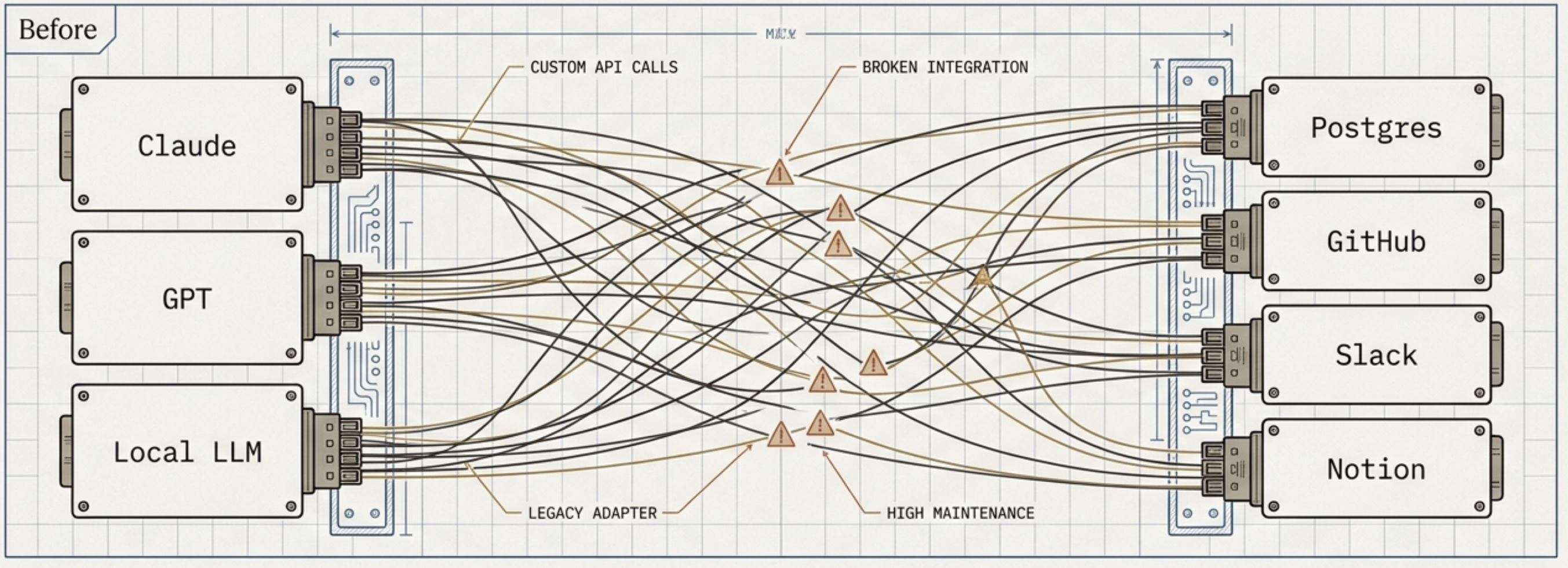
MCP (Model Context Protocol) is Anthropic’s open standard for this. Think USB-C for AI. Instead of every model needing a unique connector to every data source, MCP defines one protocol. Build your server once, and any MCP-compliant host — Claude, Cursor, Windsurf — can talk to it.
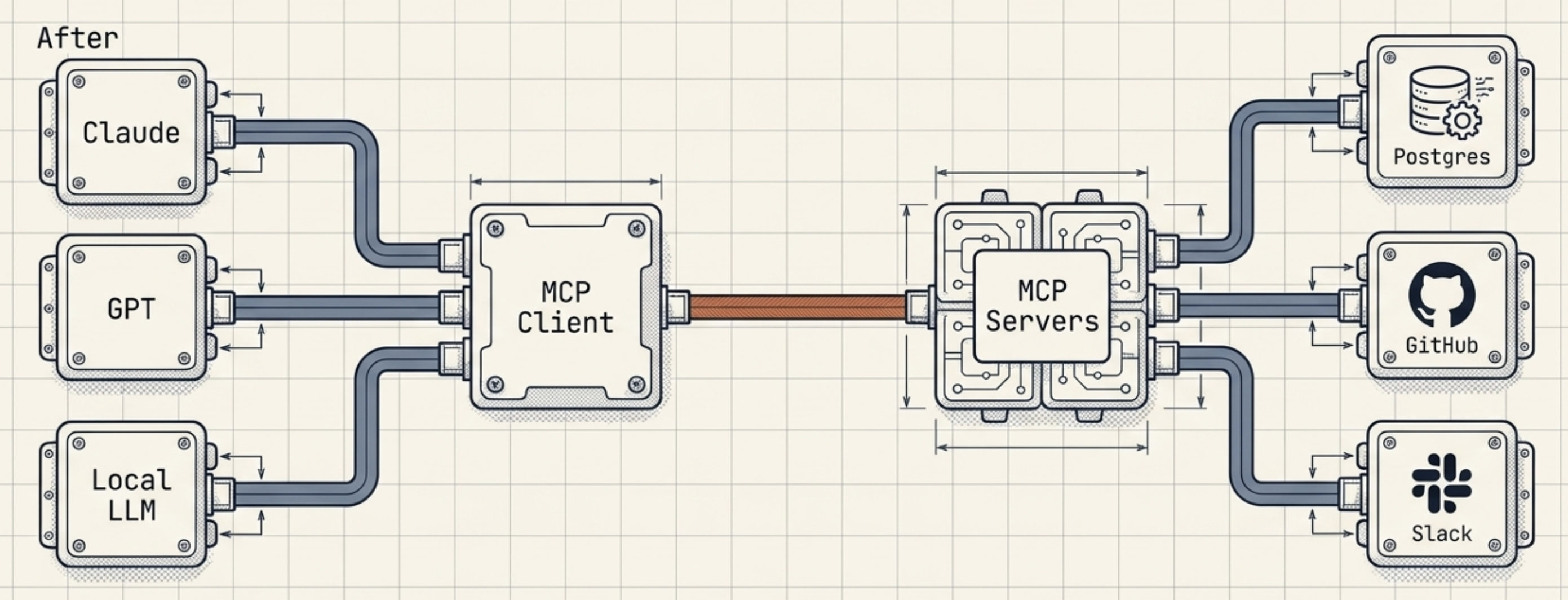
The architecture has three layers:
- Host — the AI app the user interacts with (Claude Web, Claude Desktop)
- Client — lives inside the host, manages the MCP connection
- Server — your code, exposing tools the AI can call
MCP vs REST
| REST / GraphQL | MCP | |
|---|---|---|
| Purpose | Machine-to-machine data exchange | LLM agents fetching context and invoking actions |
| Integration | Each API has a unique spec — integrate one by one | Agent learns MCP once, talks to any compliant server |
| Interaction model | Stateless, unidirectional | Stateful sessions, bidirectional, long-running tasks |
| Extensibility | Breaking changes need versioning | Server adds tools at runtime; agent discovers them automatically |
REST isn’t going anywhere. MCP is the layer that makes your existing API legible to an LLM.
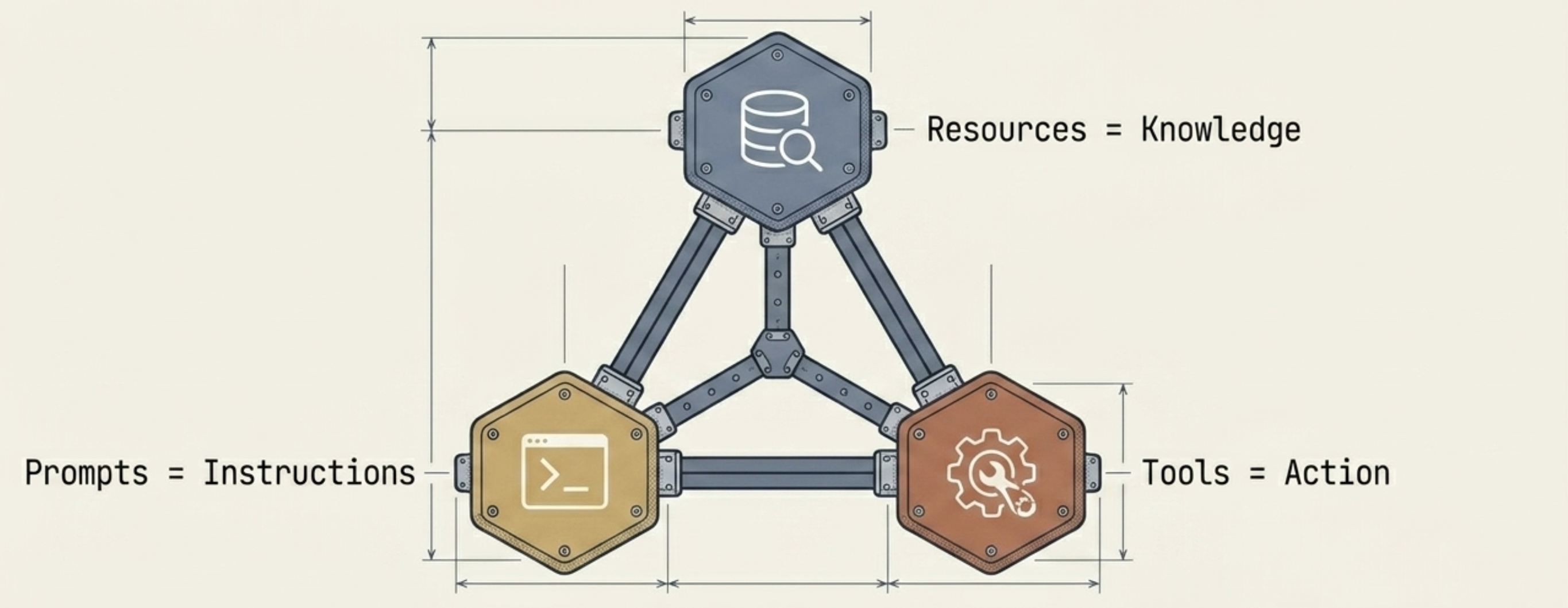
MCP servers expose three types of things: Resources (data/knowledge), Tools (callable actions), and Prompts (reusable instructions). In this post we’re focused on Tools — the most common pattern for a REST backend.
What We’re Building
A production MCP server on top of an existing Django REST Framework API. Claude Web connects, OAuth 2.1 handles auth, and the model can query your business data through tools.
Stack:
- Django + Django REST Framework
djangorestframework-mcp— converts DRF ViewSets into MCP toolsdjango-oauth-toolkit— OAuth 2.1 with PKCE- nginx (TLS) + uvicorn (ASGI)
Architecture:
1
2
3
4
5
6
7
8
9
Claude Web / Claude Desktop
        ↓  MCP over HTTP
nginx (TLS termination)
        ↓
Django ASGI app (uvicorn)
        ↓
/mcp/ endpoint
        ↓
djangorestframework-mcp → DRF ViewSets → PostgreSQL
OAuth flow — one-time per session:
1
2
3
4
5
Claude Web → /.well-known/oauth-protected-resource   (RFC 9728)
           → /.well-known/oauth-authorization-server  (RFC 8414)
           → /o/authorize/   (user logs in + consents)
           → /o/token/       (token exchange)
           → /mcp/           (authenticated tool calls)
Implementation
Step 1: Install dependencies
1
pip install djangorestframework-mcp django-oauth-toolkit
Add to INSTALLED_APPS:
1
2
3
4
5
INSTALLED_APPS = [
    ...
    'oauth2_provider',
    'djangorestframework_mcp',
]
Step 2: Expose ViewSets as MCP tools
djangorestframework-mcp uses decorators. Add @mcp_viewset to any ViewSet you want exposed, and @mcp_tool on actions to control what the LLM sees.
1
2
3
4
5
6
7
8
9
10
11
12
13
from djangorestframework_mcp.decorators import mcp_viewset, mcp_tool

@mcp_viewset(actions=['list', 'retrieve'])
class ProjectViewSet(BaseViewSet):
    queryset = Project.objects.all()
    serializer_class = ProjectSerializer

    @mcp_tool(
        input_serializer=ProjectListFilterSerializer,
        description="Returns projects. Optionally filter by customer ID."
    )
    def list(self, request, *args, **kwargs):
        return super().list(request, *args, **kwargs)
For custom (non-standard DRF) actions, register the action name in @mcp_viewset and declare input_serializer explicitly — even if there’s no input:
1
2
3
4
5
6
7
8
9
10
11
@mcp_viewset(actions=['list', 'retrieve', 'engagement_data'])
class MeetingViewSet(BaseViewSet):

    @mcp_tool(
        name='get_engagement_data',
        description="Returns aggregated engagement data for a meeting.",
        input_serializer=None,
    )
    @action(detail=True, methods=['get'])
    def engagement_data(self, request, pk=None):
        ...
Step 3: Wire up the MCP endpoint
In urls.py:
1
2
3
4
5
6
7
from djangorestframework_mcp.views import MCPView

urlpatterns = [
    ...
    path('mcp/', MCPView.as_view(), name='mcp-endpoint'),
    path('mcp', MCPView.as_view(), name='mcp-endpoint-no-slash'),
]
Register both with and without the trailing slash. Django’s APPEND_SLASH converts unmatched URLs to 301 redirects, and HTTP redirects turn POST into GET — which breaks MCP clients. Two routes sidesteps the redirect entirely.
Testing locally:
ngrok http 8000exposes localhost, then point Claude Web athttps://<ngrok-url>/mcp/. ngrok URLs reset on restart, so update Claude each time.
Step 4: OAuth 2.1 discovery endpoints
MCP clients discover your OAuth server via two well-known URLs (RFC 9728 + RFC 8414). django-oauth-toolkit doesn’t provide these — you implement them yourself.
1
2
3
4
5
6
7
8
9
10
11
12
13
14
15
16
17
18
19
20
21
22
# views/mcp.py
from django.views import View
from django.http import JsonResponse

class ProtectedResourceMetadataView(View):
    def get(self, request):
        base = request.build_absolute_uri('/').rstrip('/')
        return JsonResponse({
            "resource": f"{base}/mcp/",
            "authorization_servers": [base],
        })

class AuthorizationServerMetadataView(View):
    def get(self, request):
        base = request.build_absolute_uri('/').rstrip('/')
        return JsonResponse({
            "issuer": base,
            "authorization_endpoint": f"{base}/o/authorize/",
            "token_endpoint": f"{base}/o/token/",
            "response_types_supported": ["code"],
            "code_challenge_methods_supported": ["S256"],
        })
Wire them up in urls.py:
1
2
path('.well-known/oauth-protected-resource', ProtectedResourceMetadataView.as_view()),
path('.well-known/oauth-authorization-server', AuthorizationServerMetadataView.as_view()),
Step 5: nginx — X-Forwarded-Proto
nginx terminates TLS. Without forwarding the scheme to Django, request.build_absolute_uri() generates http:// URLs in your discovery endpoints. MCP clients then POST to http://, nginx redirects to https://, and the POST body is dropped.
nginx config:
1
2
3
4
5
location / {
    proxy_pass http://localhost:8000;
    proxy_set_header Host $host;
    proxy_set_header X-Forwarded-Proto $scheme;
}
proxy_set_header X-Forwarded-Proto $schememust be inside thelocationblock. nginx ignores server-levelproxy_set_headerdirectives for any block that defines its own.
Django settings:
1
2
SECURE_PROXY_SSL_HEADER = ('HTTP_X_FORWARDED_PROTO', 'https')
USE_X_FORWARDED_HOST = True
Step 6: Fix the login page for non-admin users
django-oauth-toolkit redirects unauthenticated users to LOGIN_URL during the consent flow. Django’s default is /admin/login/, which requires is_staff=True. Regular users can’t complete OAuth.
In urls.py:
1
path('accounts/', include('django.contrib.auth.urls')),
In settings.py:
1
LOGIN_URL = '/accounts/login/'
Create templates/registration/login.html — a basic username/password form. Any active user can now complete the consent flow without admin access.
Step 7: Create an OAuth Application
Register your MCP client using django-oauth-toolkit’s Application model:
1
2
3
4
5
6
7
8
9
10
11
12
13
14
15
from oauth2_provider.models import Application
from django.contrib.auth.models import User

user = User.objects.get(username='your_user')
app, created = Application.objects.get_or_create(
    name='MCP Client',
    defaults={
        'client_type': Application.CLIENT_PUBLIC,
        'authorization_grant_type': Application.GRANT_AUTHORIZATION_CODE,
        'redirect_uris': 'https://claude.ai/oauth/callback',
        'skip_authorization': False,
        'user': user,
    }
)
print(f"Client ID: {app.client_id}")
Use CLIENT_PUBLIC — no client secret needed because PKCE handles security.
Step 8: Scope querysets per token
MCP tokens should only see data belonging to the authenticated user. Enforce this in your base ViewSet’s get_queryset:
1
2
3
4
5
6
7
8
9
10
from oauth2_provider.models import AccessToken

class BaseViewSet(ModelViewSet):
    def get_queryset(self):
        queryset = super().get_queryset()
        token = self.request.auth
        if isinstance(token, AccessToken):
            # MCP request — filter to this user's data only
            queryset = queryset.filter(owner=token.user)
        return queryset
The isinstance(token, AccessToken) check distinguishes MCP requests (OAuth token) from regular session-authenticated requests, so you can apply different scoping logic to each without touching your existing API behavior.
Gotchas
request.data can be None
MCP sends parameters as a JSON body. If you read request.data inside get_queryset() — which runs on all requests including GETs — a frontend request with an empty body will crash it. Guard it:
1
2
data = request.data or {}
project_id = data.get('project')
Custom actions need input_serializer declared
djangorestframework-mcp checks that every custom action has input_serializer set. Skip it and the module import fails mid-way through, which can produce confusing errors downstream. Always declare it, even when there’s no input:
1
2
3
4
@mcp_tool(name='my_tool', description='...', input_serializer=None)
@action(detail=True, methods=['get'])
def my_custom_action(self, request, pk=None):
    ...
Tool descriptions drive LLM decisions
The model decides which tool to call based on your description. Be explicit: what the tool returns, when to use it, and when not to:
1
2
3
4
5
description=(
    "Returns raw per-frame data. WARNING: Can return 50,000+ rows. "
    "Do NOT use for analysis — use get_summary instead. "
    "Only use for spot-checking specific records."
)
Vague descriptions lead to wrong tool calls, wasted context, and confused users.
Large datasets will break things
An LLM has a finite context window. Dumping tens of thousands of raw rows into it will either timeout or blow the limit. Expose aggregated data by default:
1
2
3
4
5
@mcp_tool(name='get_summary', description='Returns aggregated data...', input_serializer=None)
@action(detail=True, methods=['get'])
def summary(self, request, pk=None):
    raw = MyModel.objects.filter(meeting_id=pk)
    return Response(aggregate(raw))
For endpoints that genuinely need raw data, add mandatory filters and hard-cap your pagination.