Digital Cousins: Robust Sim-to-Real Without Exact Replicas
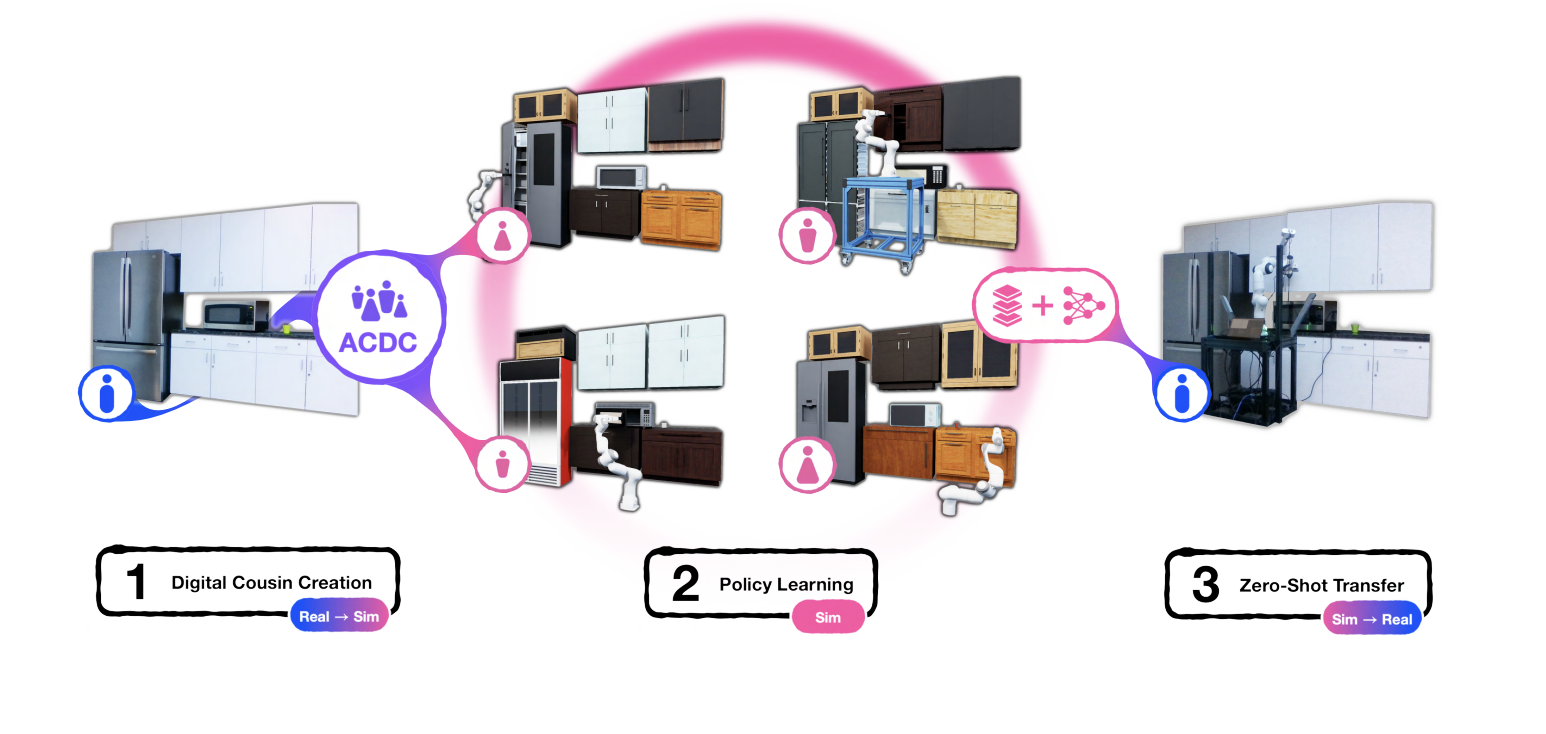
TL;DR: A digital twin is an exact simulated copy of a real scene. It’s expensive to build, and a policy trained in it overfits to that one copy. A digital cousin is a simulated scene that keeps the layout and affordances of the real one (a cabinet with similar doors and handles) but not its exact geometry. ACDC generates cousins automatically from a single RGB image. Policies trained on several cousins match twin-trained policies in-distribution, are more robust out of distribution, and transfer zero-shot to the real world: 90% real success vs 25% for the twin.
These paper reviews are written more for me and less for others. LLMs have been used in formatting
This post draws from Automated Creation of Digital Cousins for Robust Policy Learning (Dai et al., CoRL 2024).
Twins vs Cousins
There are two usual ways to get simulated training data for a real scene:
- Digital twin: reconstruct the exact scene. You get high fidelity, but it’s labour-intensive, and the policy is tuned to one instance of the world.
- Domain randomisation / procedural scenes: generate lots of variety. It’s cheap, but it isn’t grounded in the scene you actually care about.
A digital cousin sits in between. It is grounded in the real scene, like a twin, but it only has to preserve high-level properties: spatial layout, and semantic and physical affordances. A cousin of your kitchen has cabinets in the same places with similar handle and drawer layouts. The exact models can differ.
Relaxing exact reconstruction pays off twice:
- It can be automated. There’s no manual tuning to reach a fidelity bar.
- You get a distribution, not one point. A scene has one twin but can have many cousins, and training on several of them is a form of targeted randomisation.
ACDC: Image → Interactive Scene
The input is one RGB image from a calibrated camera. The pipeline has three stages, all built from off-the-shelf foundation models:
1. Extraction. GPT-4 lists the objects in the image, GroundedSAM-v2 segments them, and DepthAnything-v2 estimates depth. The result is a masked point cloud and a label for each object.
2. Matching. For each object, search a library of assets (BEHAVIOR-1K, 10k+ assets):
- Use CLIP to pick the top candidate categories from the label
- Use DINOv2 to pick candidate models by comparing the masked object crop to asset snapshots
- Compare against snapshots from many orientations to choose a pose
The top-k matches are the cousins.
3. Scene generation. Place each asset at its object’s point-cloud centroid and scale it to fit. Fit the floor and walls, ask GPT whether each object is wall-mounted, then de-penetrate everything so the scene is physically stable.
Timing: ~7s per object for extraction, ~20s per object for matching, and under 30s to assemble the scene.
Training policies without humans. Demonstrations come from scripted skills (Open, Close, Pick, Place) built on motion planning and ground-truth simulator state. Episodes where a skill fails are simply discarded, which allows aggressive randomisation. The policy is behaviour cloning on point-cloud observations, so the whole real-to-sim-to-real pipeline runs without any human demos.
Results
Sim-to-sim (door opening, drawer opening, putting away a bowl). Policies are tested on the twin and on held-out assets that get progressively less similar:
- In-distribution, cousins ≈ twin, even though the cousin policy never saw the twin.
- Held out, cousins ≫ twin. The twin policy degrades roughly in proportion to DINOv2 distance from the twin. That makes DINOv2 distance a usable proxy for how far out of distribution a test scene is.
- Training on all assets in the nearest categories is consistently bad. Undirected randomisation isn’t automatically useful. Cousins act as conditioned randomisation.
Sim-to-real (opening the door of a real IKEA cabinet, zero-shot):
| Policy | Sim success | Real success |
|---|---|---|
| Twin | 100% | 25% |
| Twin + more randomisation | 70% | 55% |
| Twin + Cousins | 92% | 95% |
| Cousins only | 94% | 90% |
The twin is perfect in sim and falls apart on the real robot. More randomisation on the twin helps only partly. The cousin policies transfer.
They also run the full pipeline end to end on a real kitchen (photo → cousins → sim demos → policy), and the robot opens the real cabinet.
Appendix Nuggets
DINOv2 beats CLIP for picking cousins. Policies trained on cousins chosen by CLIP never exceed 80% even on the twin. With DINOv2 they reach ~90%. CLIP captures semantics, but choosing cousins needs geometry (door count, handle design), and DINOv2 features carry more of it.
DINO + GPT acts as a “dense sampler”. Letting GPT choose from DINOv2’s shortlist produces cousins with the least geometric variance, all with similarly arranged doors and handles. It gets category and model right more often than DINOv2 alone, which gets confused by lighting, occlusion and scale.
Cousins should form a continuous distribution. In the drawer task, 4-cousin policies underperformed. The DINO distances of those four cousins to the twin were 7.8, 9.3, 14.1, 14.9: two tight pairs with a jump between them. The door cousins, spread evenly at 6.5, 7.5, 8.1, 9.7, worked fine. When the asset library for a category is thin, use more cousins.
Cousin policies are more stable across seeds. Across random seeds, policies trained on all assets varied the most, twin policies next, and 8-cousin policies the least. They also need less tuning.
You don’t need an exact twin. A 50/50 mix of twin and cousin data performs about the same as cousins alone. The twin adds little once you have cousins.
Matching with DINOv2 patches. For every patch in the input, find its nearest-neighbour patch across all candidate snapshots and count the votes per candidate. The candidate with the most votes wins. When computing distances, drop the top 10% of nearest-neighbour distances as outliers, which makes the rankings much more distinct.
Orientation: GPT or DINO? Choosing orientation with DINOv2 (re-render the asset in each candidate pose and compare) is more accurate but takes ~60s per object. GPT takes <10s. Since orientation gets randomised during training anyway, they use GPT.
Estimated depth over a depth camera. DepthAnything-v2 handles reflective surfaces more reliably than a real depth sensor. DBSCAN removes noisy points near object boundaries.
Where It Breaks: Running ACDC Myself
I ran the released code on my own scenes and on the repo’s sample kitchen. Most of what went wrong fits into four problems.
1. Only “on top” relationships
The repo says so directly: “We currently only support OnTop cross-object relationships, so there might be artifacts if an object is ‘In’ another object, like books in a bookshelf.” In practice, anything inside furniture gets moved on top of it.
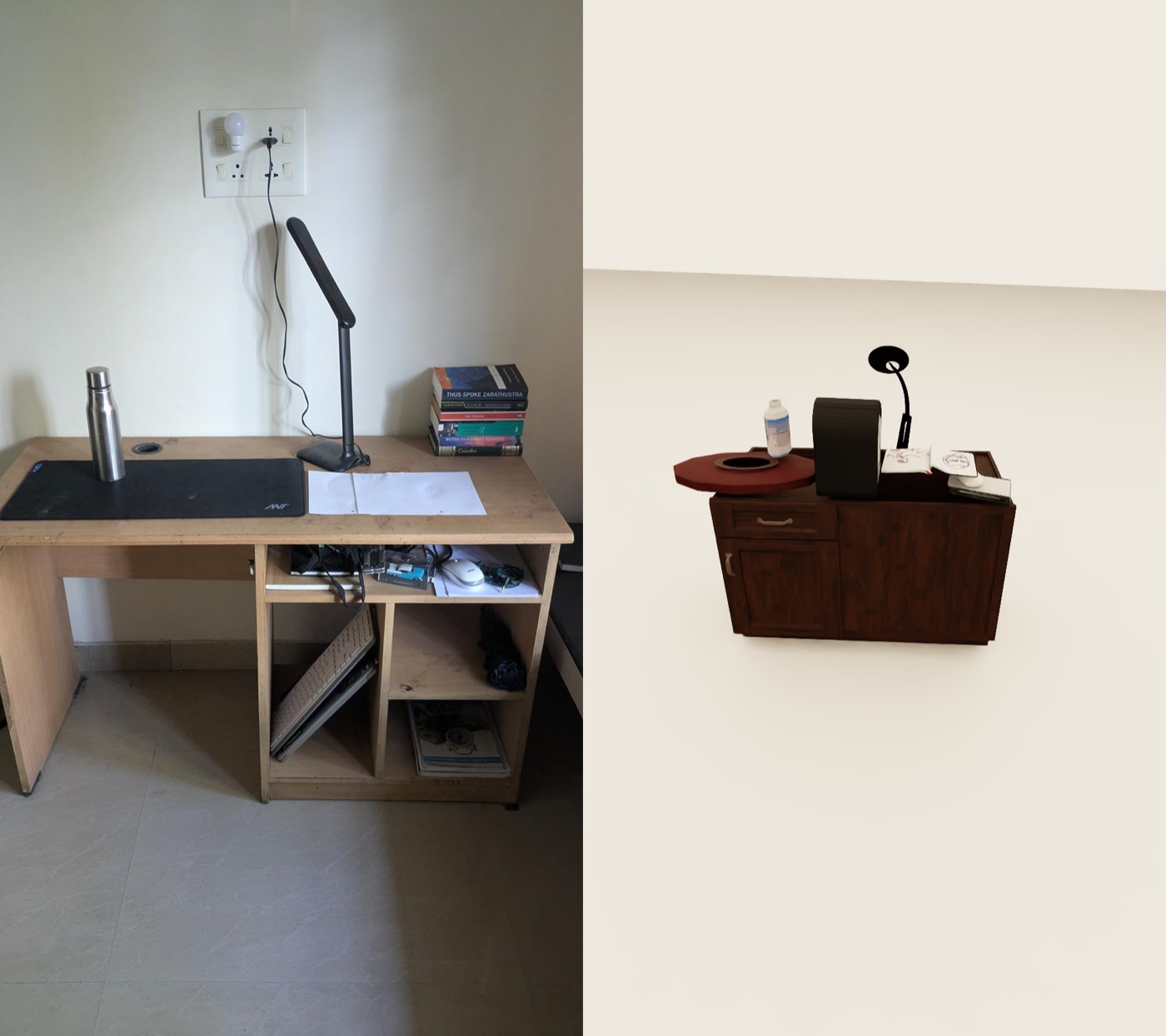 Left: my desk. Right: its cousin. The keyboard, mouse and notebooks from the shelves are all piled on the tabletop, and the lamp and desk look nothing like the real ones.
2. The asset library sets the ceiling
The same image shows this too. The slim desk lamp becomes a very different lamp, and the wooden study desk becomes a dark two-door cabinet. A cousin can only be as close as the nearest asset in BEHAVIOR-1K. The paper acknowledges this: there is one pot, one toaster and two coffee makers in the whole library.
3. Pose search only rotates around the vertical axis
To pick an object’s orientation, ACDC compares it against ~100 snapshots of the asset, all rotated about the vertical (z) axis. Every candidate is upright. An object tilted about x or y, like a leaning book or the keyboard propped inside my desk, has no matching pose.
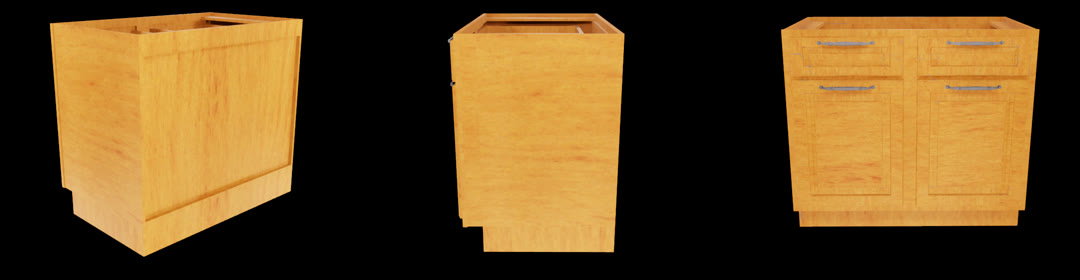 Three of the orientation candidates for one cabinet: the same asset turned about z, never tilted.
4. One GPT answer decides irreversible steps
Several early stages take a single GPT response as final. On the repo’s own sample kitchen I hit two of these, and reported them in #41 and #42:
- The backsplash is discarded (#42). GPT rejected the backsplash as a mounting surface. With nothing to mount on, the upper cabinets and microwave were treated as floor objects and fell into a stacked heap. Setting
filter_backsplash=Falsemounts them correctly. - Cabinets re-captioned as fridges (#41). The detector labelled the upper cabinets “cabinet”, then GPT’s re-caption changed them to “refrigerator”, and asset retrieval used the new label. That’s why fridges appear where the upper cabinets should be in both renders below.
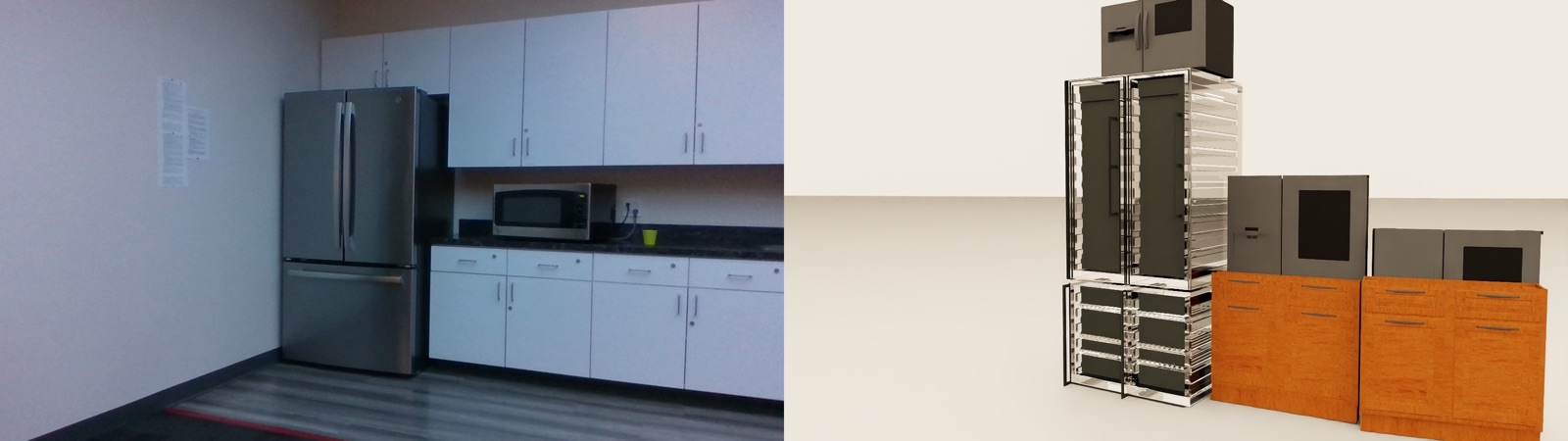 Default run: the backsplash is filtered out, so the upper cabinets aren’t wall-mounted and collapse.
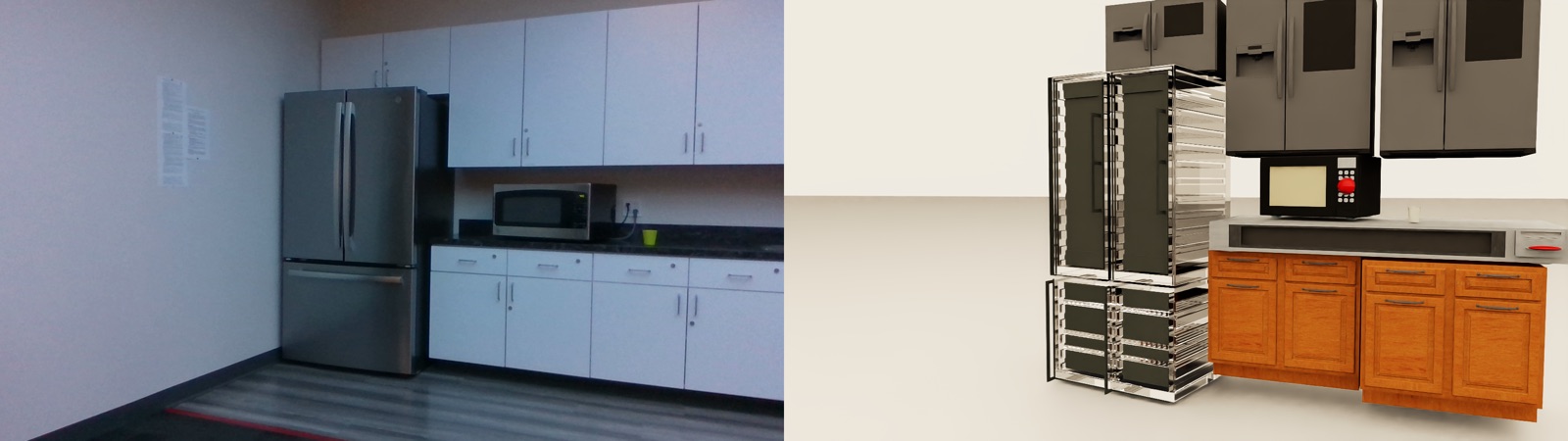 With the backsplash kept, the upper units are mounted above the counter. They are still fridges, though, because of the re-caption.
The GPT answers aren’t saved in the output files, so these failures take work to trace back.
Also from the paper
- Depth errors on objects with fine detail (plants, fences), and heavy occlusion of smooth objects.
- Category names that don’t line up with the library (“cup” vs “coffee cup” vs “water cup”).
- Scripted skills limit the tasks to open, close, pick and place.
Key Takeaways
- Keep a scene’s layout and affordances, not its exact geometry, and you get a distribution of training scenes instead of one fragile replica.
- Cousins match twins in-distribution, beat them out of distribution, and are the difference between 25% and 90% on the real robot.
- Targeted variation beats both zero variation (the twin) and undirected variation (all assets).
- For choosing geometrically similar assets, DINOv2 features beat CLIP.
- Cousins should cover the space evenly. Gaps in similarity hurt.